How it works
Devsy provisions workspaces on any infrastructure. It wraps the CLI tools you already use — kubectl, docker, gcloud, and others — to deploy your development environment and run the dev container. When creating a workspace, Devsy deploys an agent to both the host machine and the container to handle port forwarding, credential forwarding, and log streaming. The agent acts as a control plane across your development environment.
Devsy uses a client-agent architecture. The client deploys its own agent, which hosts a gRPC server and an SSH server. This resembles a browser-server architecture where the front end is delivered to a remote host. Two practical wins:
- No version conflict between client and server — you only install the client.
- No infrastructure to manage.
For easier debugging, Devsy pipes the agent's STDIO to your local shell so you can see what's happening locally and inside the container.
Below is a high level overview of how Devsy uses your local environment, a source repo and a devcontainer to deploy your workspace to the cloud.
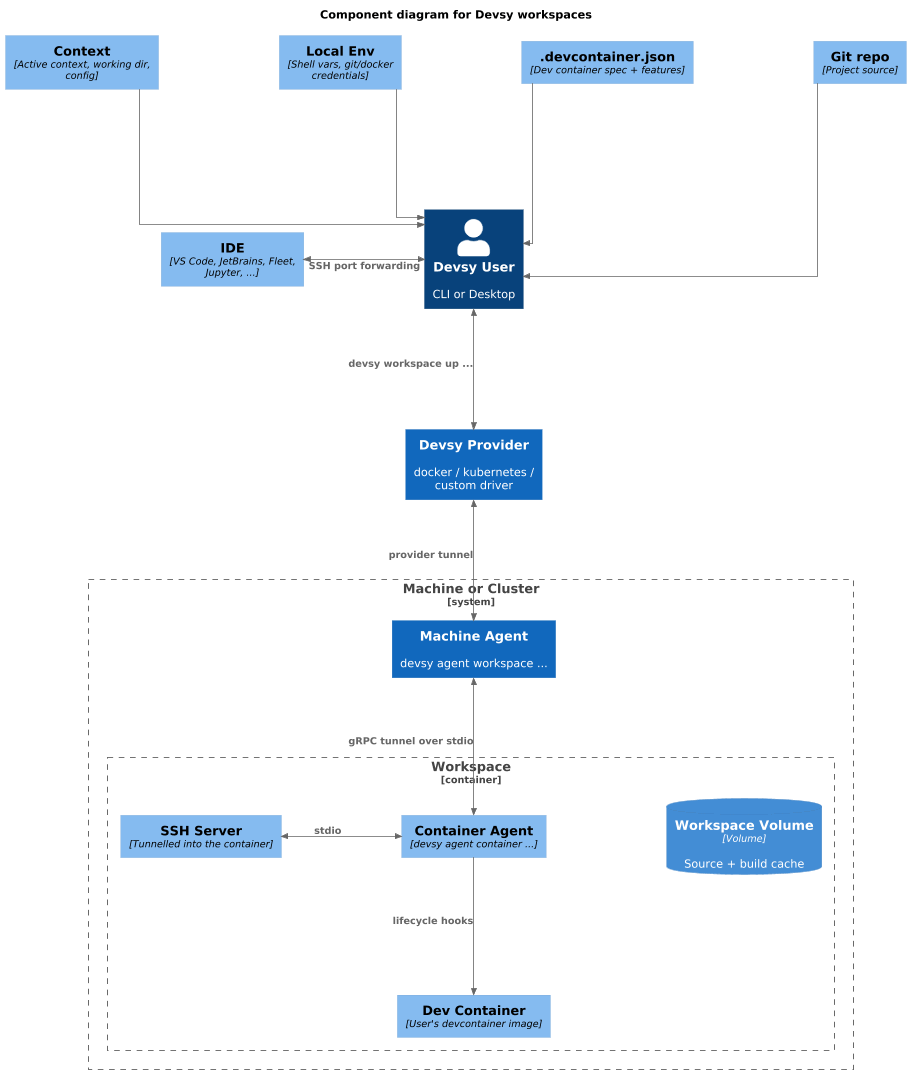
Devsy connects to the workspace through a vendor-specific channel called the tunnel. When you run devsy workspace up, Devsy picks a provider based on your context and starts your devcontainer. Machine providers create a VM first if needed. Once the devcontainer is running, Devsy deploys the agent into it.
The tunnel's transport depends on the provider — AWS uses Instance Connect, Kubernetes uses the control plane via kubectl, and so on. The Devsy agent starts an SSH server over the tunnel's STDIO so the local CLI/UI can forward ports. Devsy then opens your local IDE and connects it to the devcontainer over SSH.
Port forwarding requires an active IDE or SSH session — Devsy needs the agent's SSH server, which only runs while one of those connections is open.